🌐 Monitor Your AstroLink with ThingsBoard
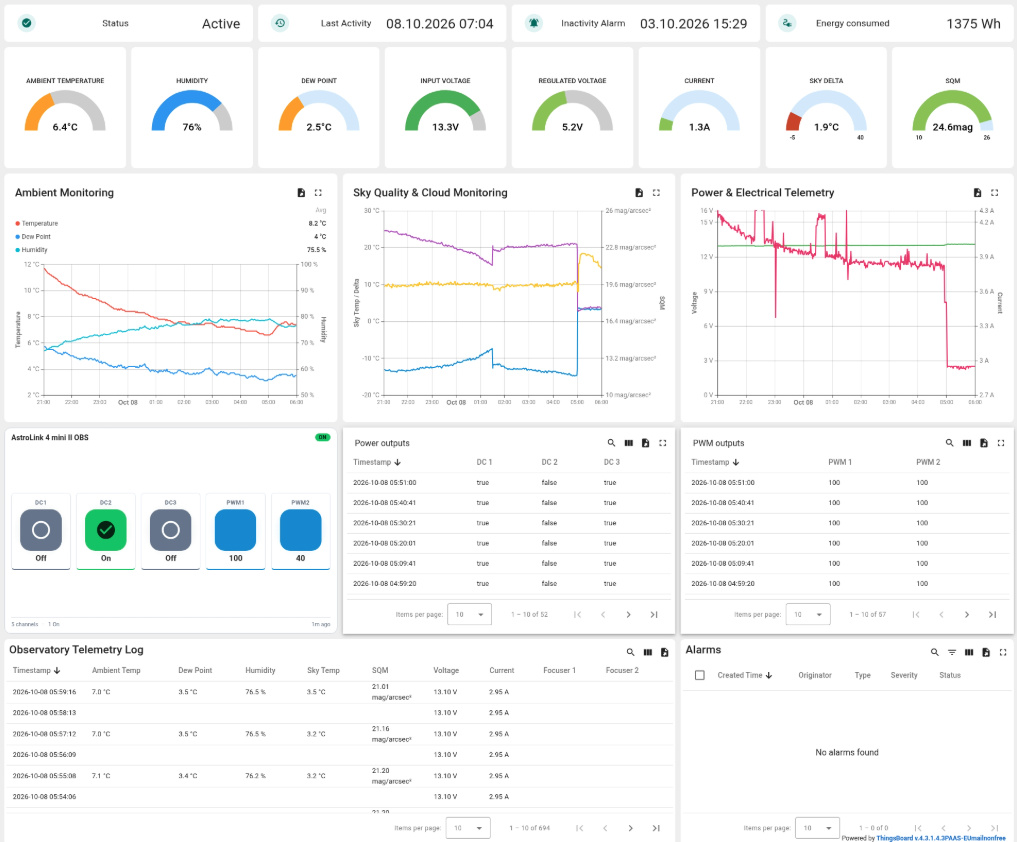
Keep an eye on your astrophotography setup from your computer, tablet or phone. AstroLink 4 Panel can publish telemetry to ThingsBoard, where dashboards bring together current readings, charts and historical data.
Depending on your controller and connected sensors, you can monitor:
- 🌡️ Temperature, humidity and dew point
- ☁️ Sky temperature and sky brightness
- ⚡ Voltage, current and energy consumption
- 🎯 Focuser positions
- 🔌 Power output states, dew heater levels and protection status
The integration provides monitoring only. It does not remotely control focusers or power outputs.
🚀 Example: Connect an AstroLink 4 MAX
You will need your AstroLink connected to AstroLink 4 Panel, internet access on the computer running the Panel, and a ThingsBoard account.
1. Create a ThingsBoard device
Register at ThingsBoard Cloud EU or ThingsBoard Cloud, choosing the appropriate region.
Open Devices, add a device named AstroLink 4 MAX, then open its credentials and copy the access token.
2. Enable telemetry in AstroLink 4 Panel
With the Panel connected to your controller, open Settings → ThingsBoard integration.
- Enable ThingsBoard telemetry.
- Enter your server address:
https://eu.thingsboard.cloudorhttps://thingsboard.cloud, matching your account. - Paste the device access token.
- Click Test to verify the connection, then Save.
Keep your token private, just like a password.
3. Import the AstroLink dashboard
Download the ready-made dashboard JSON file from the AstroLink software downloads page.
In ThingsBoard, open Dashboards → Add dashboard → Import dashboard and upload the file. Open the imported dashboard and, if required, edit its entity alias to select the device you created.
You can now view your telemetry and customize the dashboard with additional charts or indicators.
📊 Follow Your Session
For example, watch temperature and humidity through the night, review focuser position changes, and check how input voltage varies as equipment runs.
The Panel sends updates periodically or when values change, so dashboard readings may not update immediately. You can also configure ThingsBoard alarms for conditions such as low voltage or missing telemetry.
AstroLink 4 Panel must remain running and connected to your controller to send data. The controller itself does not connect directly to the cloud.
For detailed settings and troubleshooting, see the ThingsBoard integration chapter in the AstroLink 4 Panel manual.
📱 More Than a Dashboard
ThingsBoard also lets you:
- Set up alerts for low voltage, excessive current, unavailable sensors or missing telemetry.
- Receive notifications through supported channels, depending on your ThingsBoard plan and configuration.
- Monitor on your phone or tablet using the ThingsBoard mobile app for Android and iOS. Use the same account and cloud region as configured in AstroLink 4 Panel.
- Review historical data to compare sessions and spot changes in environmental conditions or power consumption.
- Customize dashboards with charts, gauges and status indicators tailored to your setup.
Alert rules and notifications are configured in ThingsBoard. Available features and data retention depend on your plan or server configuration.


